
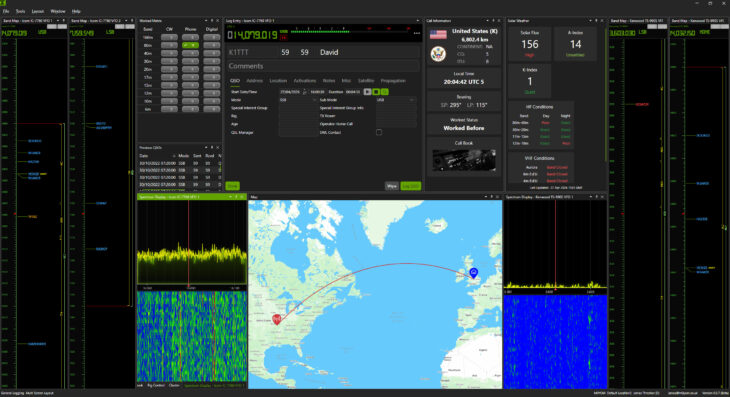
I’m sure some of you have been wondering why it’s been so quiet here for a while. Well, after a lot of development, testing, and refinement, I’m excited to officially announce the launch of QSO Director, a new piece of software designed to simplify and enhance how amateur radio operators make and manage their QSOs.
You can check it out here: https://qso-director.com
Here’s what it’s all about.
What is QSO Director?

QSO Director is a purpose-built application for radio amateurs who want better control, visibility, and efficiency when logging and managing contacts. Whether you’re operating casually or running more complex setups, QSO Director aims to streamline your workflow without getting in your way.
The goal is simple: build a modern, highly functional application that supports every style of operating, from DX hunting and activations to contesting and casual rag chewing, all in one place, on any operating system.
One application, done properly – without compromise.
There are too many features to list here, but some of the highlights are:
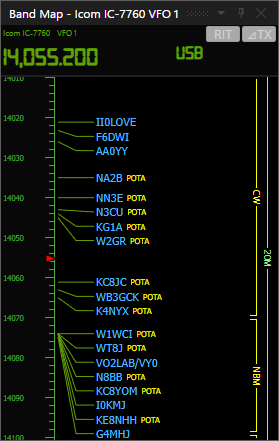
- Highly performant rig control – built from the ground up for a smooth, responsive experience
- Unlimited layout flexibility – single window, multi-window, multi-monitor, with saved layouts
- Cross-platform – native support for Windows, macOS, and Linux
- Cloud-connected – automatic sync with QSO Director Cloud, plus QRZ.com and Club Log integration
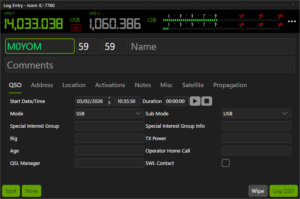
- Flexible logging – keep it simple or capture rich, detailed QSO data
- Callbook integration – supports QRZ, HamQTH, QRZCQ, HamCall, and HamDB
- Spectrum scope support – display multiple scope-capable rigs simultaneously
You can read about all the features in more detail at https://qso-director.com
Why I Built It
 Like many of you, I’ve used a range of logging and radio control tools over the years. While there are some excellent options out there, I often found gaps in usability, flexibility, or integration. They’re often dated and focused on a narrow range of operating styles.
For example, if I wanted to run a net, Log4OM was great.
If I wanted to take part in a contest, N1MM was my go-to option.
If I wanted to track a rich set of log data, HRD was a good choice.
And if I wanted to use Linux or macOS, I’d often have to look for something completely different.
I’ve spent my professional life developing products for large businesses, and very little in the amateur radio space felt polished or professional.
QSO Director started as a personal project to solve those frustrations.
Commercial Product
I’m now working on QSO Director full time. To deliver the level of quality, features, and ongoing development this project deserves, it needs to be a commercial product.
Unlike ACOM Director, QSO Director is a paid application.
However, I’ve kept pricing low (less than a cup of coffee a month) to make it accessible to as many operators as possible.
Would you like to be more involved?
I’m offering a small number of free early access licences for operators who are regularly on air and willing to provide meaningful feedback or get more actively involved in shaping the project.
I’m happy to answer questions or take criticism, I’d genuinely like to know what you think.
What stage is the project at?
QSO Director is currently in early access and already includes a substantial set of features.
Development is ongoing, with major capabilities including contesting, DX hunting, and dedicated activation support planned over the coming months.
You can read more about the features and sign up for early access here: https://qso-director.com
Anyone signing up during early access will receive a discounted price locked in for life.
What’s Next?
 This is just the beginning.
I’ve got a really exciting roadmap of features planned, and I’d really value feedback from the community. If you try QSO Director, let me know what works, what doesn’t, and what you’d like to see added.
For those using ACOM equipment, support currently found in ACOM Director will be integrated directly into QSO Director, bringing amplifier control into the same application as your logging workflow.
A new cross-platform version of standalone ACOM Director will also be released alongside this, and it will remain free.
Final Thoughts
Launching this has been a big milestone, and I’m genuinely excited to see how it’s used out in the wild.
If you’re looking for a truly modern, cloud-connected, multi-platform logging solution, I’d love for you to give QSO Director a try.
Thanks for reading, and as always, see you on the air.
73 James M0YOM

Windows refuses to let me download QSO Director. M7YTZ
Hi Chris,
I’ve just dropped you an email from my qso-director.com email address
73 James M0YOM
Hi James,
I hadn’t read the change log for 0.6.14 and now I can’t find it. Can you briefly summarize the changes? Realizing the program is in beta with many changes and improvements to come, I’ve noticed the following so far:
1. The map shows a fixed path regardless of the previous QSO that I bring up.
2. No spectrum scope shows up in the spectrum scope window for my FT-710…not sure if that particular radio doesn’t support it or if further improvements are planned?
Again, I understand this is all in beta, but I saw that you were looking for feedback from early users, so I’m hoping this is helpful to you!
73, Bill W1WH
Hi Bill,
The change logs for the beta release channel are only posted on the discord group at the moment. Versions 0.6.12 through 0.6.14 don’t have any practical changes in them but have some additional debug code specific to the IC-7100 which is currently experiencing some problems connecting.
Would you mind emailing me a screenshot of the map path you’re getting to support at qso-director.com.
The FT-710 scope isn’t currently supported, but I’m working on it along with support for the SCU-LAN10 which for those who have one will add scope support for all the more modern Yaesu rigs.
I appreciate the feedback, it’s all very welcome. I very much appreciate it.
Kind Regards
73 James M0YOM
Will do James.
Thanks for the info on the FT-710 scope. I had done a little research last night and reached the same conclusion. If you can support it in the future, that would be great!
73, Bill W1WH
Thanks Bill,
Development to support it is already in progress, so hopefully it won’t be too long before support is added.
73 James M0YOM
Gorgeous! I just signed up and am learning, but the mode header keeps jittering — like it’s in a loop or something. How can I fix? Flex 8400, WIN 11.
Hi Joe,
Could you please drop me an email to support at qso-director.com I’ve not heard of this happening before and we’ve got quite a few flex users.
I may need to get you to enable Debug Logging in the radio settings for a few minutes and send over the log file to investigate (They get stored in the RadioLogs folder inside the location you chose to store your logs). Don’t leave debug logging enabled in radio settings for more than a few minutes though as it can generate very large files otherwise.
Thanks
73 James M0YOM
Just curious, being in the US how would the subscription be handled. Also can the sub be paid yearly? I am currently without a logging app. I have watch you on Callum’s YouTube channel and was very impressed.
Hi Allan,
The subscription is handled the same worldwide, you are billed in your local currency, payment is accepted from almost all countries including the US. There is an annual subscription option which is a little cheaper than the monthly one for those that prefer to pay annually.
73 James M0YOM