
ACOM600S or ACOM1200S Users – This page applies to ACOM Director Classic which only supports the ACOM2000A, ACOM Director Plus supports the ACOM600S and ACOM1200S (ACOM2000A support coming soon). For ACOM Director Plus downloads please go here, a dedicated ACOM Director Plus page will be added once development is complete.
ACOM Director Classic is a free software package designed to allow the computer control of the ACOM 2000A HF Amplifier.
Version 0.7.1 now includes integration with Logger32 to allow the ACOM 2000A to track the frequency of your radio.
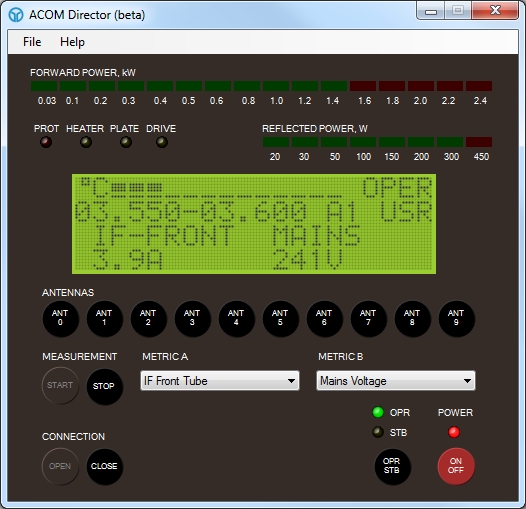
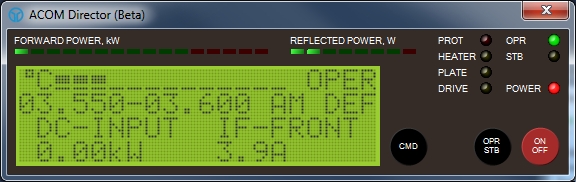
The software is in beta at the moment and is still very much a work in progress, your feedback and suggestions are very much welcome, please contact me here with any comments that you would like to make.
ACOM Director Classic is provided free of charge and you may use the software on as many machines as you like, however I would ask that you not host your own copies for download, but rather link back to this page in order to ensure that anyone looking for the software will always have the latest version available to them.
I am in no way connected to ACOM and provide this software without any warranties or guarantees, you use it entirely at your own risk.
Download the latest version here

- 1
- 2
System Requirements
You will require a Windows XP/Vista/7/8/8.1/10 either 32-bit or 64-bit with the Microsoft.NET 3.5 SP1 Framework installed
How do I connect a computer to my ACOM2000A?
There are two ways of connecting your computer to the ACOM2000A HF amplifier
Method 1 – Basic Null Modem Cable
You will need to connect a com port on your computer to the RS232 port on the rear of the ACOM2000A using a basic null modem cable. The wiring for the null modem cable should be as follows
Pin 1 – No Connection
Pin 2 – Pin 3
Pin 3 – Pin 2
Pin 4 – No Connection
Pin 5 – Pin 5
Pin 6 – No Connection
Pin 7 – No Connection
Pin 8 – No Connection
Pin 9 – No Connection
It is important that you do not use a “Full” Null Modem cable with all its pin connections made. This is because the ACOM2000A’s RS232 port does not appear to be a real RS232 port and it utilises the other pins for ACOM’s own purposes. These appear to be undocumented however there have been reports that useage of a “Full” Null modem cable can cause errors to appear on the RCU (With “Microprocessor conflict” being the most common) or could even cause damage to the computer’s COM port due to excessive voltage on the other lines.
Please note that when using this method, you will not be able to power on the ACOM2000A using ACOM Director.
Method 2 – Through a remote power on adaptor
ACOM themselves provide a remote power on adaptor and there are a number of homebrew solutions available on the internet. All of these solutions essentially operate in the same manner, using the RTS & DTR lines of the COM port to switch pin 5 of the RCU connector in order to turn on the amplifier.
You will typically need a “Full” Null Modem cable if you are using one of these devices, however some designs will have the cross over of Pin 2 & Pin 3 built into the adaptor, in which case a regular RS232 cable will be required.
Donations & Support
Whilst I provide the software free of charge, I have been asked by a number of people if I would be willing to accept donations. I have chosen not to accept donations as I feel that this project is part of my small contribution to the Amateur Radio Community. If however you can offer help and assistance in progressing this project, please contact me here
Release History
0.2.0 (Beta)
Initial Release
0.4.0 (Beta)
FIX: The red Fwd Power and Rfl Power LED’s were not gradient shaded when lit.
FIX: Exit menu option did not work
FIX: The Forward and Reflected power indicators would often show an extra led when compared to the RCU
NEW: Added splash screen
NEW: Overhaul of the UI Logic, seperated out to support multiple UI’s
NEW: Overhaul of the ACOM2000A State Management in order to support multiple UI’s
NEW: Application now runs with an icon in the system tray
NEW: Added the ability to keep the control panel window on top of all other windows
NEW: Added improved error handling with the ability to email back error details for quicker debugging of problems
NEW: New Single Instance system added to stop multiple copies of the application being run
NEW: Added new mini version of the control panel
NEW: Removed the drop down menus from the control panel screen, these are now available by right clicking on the system tray icon
NEW: Double clicking the system tray icon now displays the control panel window
NEW: Closing the control panel window no longer closes the application, you must right click on the system tray icon and select “Exit” to quit
NEW: Added the ability to support many different control panel types in the future
NEW: Control Panel Window position is now remembered
NEW: Each type of control panel remembers it’s window position independantly
NEW: Removed the ability to minimize the control panel windows as closing them serves the same purpose
NEW: Added the ability to choose between control panel types and switch types on the fly
NEW: Added the option to show the control panel on startup
0.4.1 (Beta)
FIX: Installation routines were set to require .NET 4.0 when it should have been using .NET 3.5 SP1
0.4.2 (Beta)
FIX: When upgrading from a previous version the RS232 components were not being updated correctly
0.4.3 (Beta)
FIX: When measuring HV the figure displayed did not match that displayed when measuring HV using the RCU
FIX: Some users experiencing a System.UnauthorizedAccessException when trying to save the config file, config file is now stored in the users ‘Application Data’ folder
FIX: Configuration Dialog box causes error on some machines due to windows reporting duplicate COM ports (System.ArgumentException Message : An entry with the same key already exists.)
FIX: The Meaurement Metric drop downs were “Jumping” around and not easily allowing the user to pick a measurement item on large control panel interface
0.5.0 (Beta)
FIX: Object reference not set to an instance of an object. could sometimes be generated when closing the control panel
NEW: Completely New Installation Routines
NEW: Added the ability for the software to operate remotley over a network or the internet
NEW: Restructured ACOM Message processor for easier maintenance
NEW: Software now released under the BSD 3-Clause License
0.7.1 (Beta)
NEW: Added labels to the LED bars on the mini layout
NEW: Changed the Colour Scheme to Red for better visibility on Windows XP Toolbars
NEW: Added Logger32 Interface with Frequency Tracking, This can be enabled in the configuration window
0.7.2 (Beta)
FIX: Increased Power On DTR+RTS Impulse to 10 Seconds
NEW: Renamed to ACOM Director Classic
0.8.0 (Beta) – CONSIDERED UNSTABLE
NEW: Added DXLog Support
NEW: Changed a lot of backend code
NEW: Moved to .NET 4.0 Framework
0.8.1 (Beta) – CONSIDERED UNSTABLE
FIX: Increased Power On DTR+RTS Impulse to 10 Seconds
NEW: Renamed to ACOM Director Classic